This afternoon while organizing my blog in Typora, I suddenly discovered that all images uploaded to Cloudflare R2 through PicGo had turned into broken images. Accessing the image links directly in the browser returned 403, but PicGo's upload logs showed success. After some troubleshooting, I finally found the culprit in PicGo's outputURLPattern configuration—it wasn't that the image hosting service was down, but that the URL wasn't constructed correctly at all.
Symptom: Upload Successful, but Typora Won't Render
Here's what happened:
- I had Cloudflare R2 configured in PicGo (via S3-compatible API).
- Clicked upload, PicGo showed success and returned a link.
- Pasted the link into Typora, but it only displayed a blue line of text or showed broken images.
I instinctively thought the image hosting service was down, because the returned domain looked like this:
https://xxxassets.hashcode.r2.cloudflarestorage.com/2026/07/xxx.pngBut here's the strange part: when I used the public access domain that Cloudflare bound to R2 (https://pub-hashcode.r2.dev) and concatenated the same path, the browser could open it normally.
In other words: The image hosting service wasn't down; PicGo was generating a malformed URL.
Troubleshooting: Which Layer Is Failing
I did step-by-step isolation testing:
| Verification Item | Result |
|---|---|
| Browser directly accessing R2's S3 API domain | 403, because R2's r2.cloudflarestorage.com is a private endpoint and doesn't allow public access by default |
Browser accessing public domain r2.dev + same path | 200, image displays normally |
Changed link in Typora to r2.dev domain | Still won't render |
| Checked PicGo's custom domain configuration | Found that only https://pub-xxx.r2.dev was filled in; after upload, the returned URL only had the domain with no file path afterward |
At this point, the problem split into two issues:
- Wrong domain: Should use the
r2.devpublic domain, not thecloudflarestorage.comprivate endpoint. - Incomplete URL concatenation: PicGo only returned the domain root, missing the
/2026/07/xxx.pngportion.
Root Cause: Misunderstood the Placeholder in outputURLPattern
PicGo's S3 plugin documentation clearly states: the old urlPrefix and urlSuffix are deprecated; use outputURLPattern instead.
My initial outputURLPattern configuration (incorrect) was:
https://pub-hashcode.r2.dev/{md5}.{extName}And my uploadPath configuration was:
{year}/{month}/{md5}.{extName}After upload, PicGo returned:
https://pub-hashcode.r2.dev/2026/07/{md5}.pngThe {md5} was output as-is without being replaced with the actual hash value.
The core issue: outputURLPattern does not support the {md5} placeholder.
The documentation clearly lists which variables outputURLPattern supports:
| Placeholder | Description |
|---|---|
{path} | Complete path, equals {dir}/{uploadedFileName} |
{uploadedFileName} | Uploaded filename (including extension) |
{dir} | Upload directory |
{protocol}, {host}, {port} | URL components |
{md5}, {year}, {month} and similar are only valid in the upload path uploadPath. Once a file is named as {md5}.{extName} and uploaded to the {year}/{month}/ directory, its identity in the output template has already changed to {uploadedFileName}, and its directory has become {dir}.
So when I wrote {md5} in outputURLPattern, PicGo didn't recognize it and simply output the string {md5} as-is.
Fix: Use {path} and Done
The correct outputURLPattern should be:
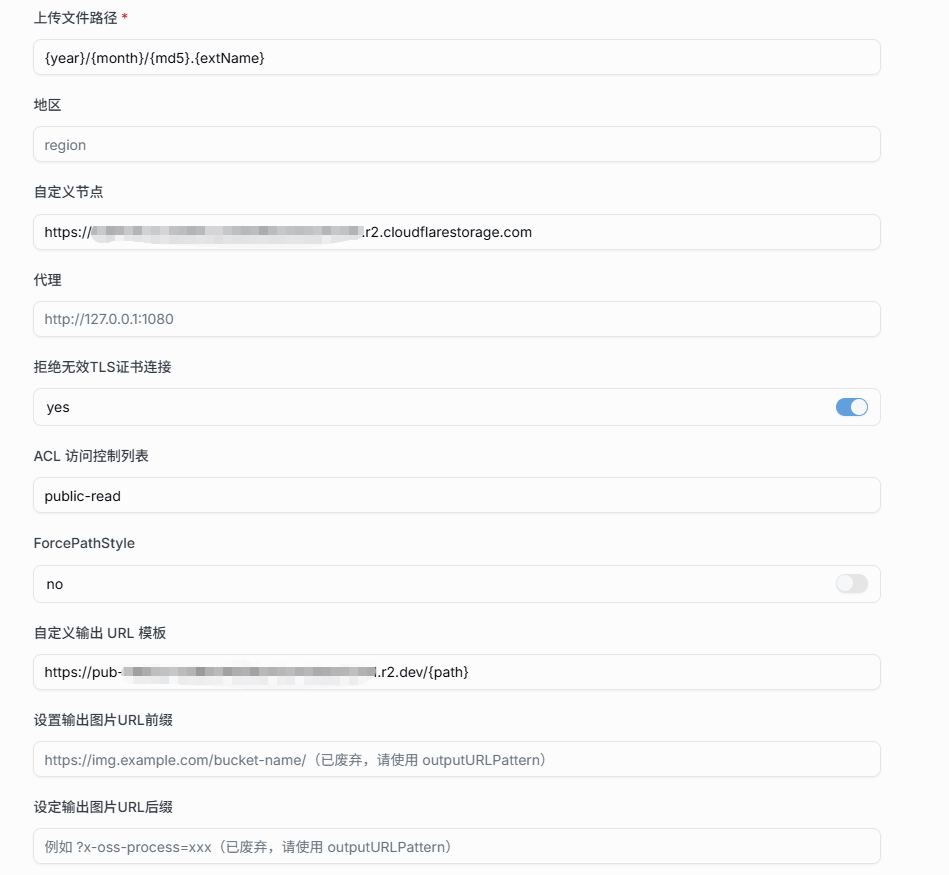
https://pub-hashcode.r2.dev/{path}The complete configuration should be:
| Configuration Item | Value |
|---|---|
uploadPath | {year}/{month}/{md5}.{extName} |
endpoint | https://...r2.cloudflarestorage.com |
customUrl | https://pub-hashcode.r2.dev |
outputURLPattern | https://pub-hashcode.r2.dev/{path} |
After saving and re-uploading, the link returned by PicGo became:
https://pub-hashcode.r2.dev/2026/07/xxxxxx.pngTypora immediately rendered it correctly.
Below is the configuration page in PicGo:
Lessons Learned
-
R2's S3 API endpoint ≠ public access endpoint.
*.r2.cloudflarestorage.comis for program calls; to show images to visitors, you must bind it to*.r2.devor use a custom domain, and output the correct public address throughoutputURLPatternin PicGo. -
The placeholders in
uploadPathandoutputURLPatternare different things.{md5},{year}are only available when defining upload directory and filename; when outputting URLs, the file has already been stored, so you need to use{path},{uploadedFileName},{dir}to reference it. -
Broken images don't always mean the image hosting service is down. Try accessing the image URL directly in your browser first to confirm whether it's a permissions issue, path issue, or Markdown syntax issue—this can save you a lot of trouble.